
Why You Cannot Just Load Everything
A table listing a few dozen rows can render an entire result set on one page without issue. The same approach against a table with tens of thousands of rows produces a slow query, a huge HTML response, and a browser straining to render it all. Pagination breaks a large result set into manageable pages, and implementing it correctly in PHP and MySQL involves more subtlety than the basic LIMIT clause most tutorials stop at.
Basic Offset Pagination
$page = max(1, (int) ($_GET['page'] ?? 1));
$perPage = 20;
$offset = ($page - 1) * $perPage;

$stmt = $pdo->prepare('SELECT * FROM products ORDER BY created_at DESC LIMIT :limit OFFSET :offset');
$stmt->bindValue('limit', $perPage, PDO::PARAM_INT);
$stmt->bindValue('offset', $offset, PDO::PARAM_INT);
$stmt->execute();
$products = $stmt->fetchAll();
To render page links, you also need the total row count:
$total = $pdo->query('SELECT COUNT(*) FROM products')->fetchColumn();
$totalPages = (int) ceil($total / $perPage);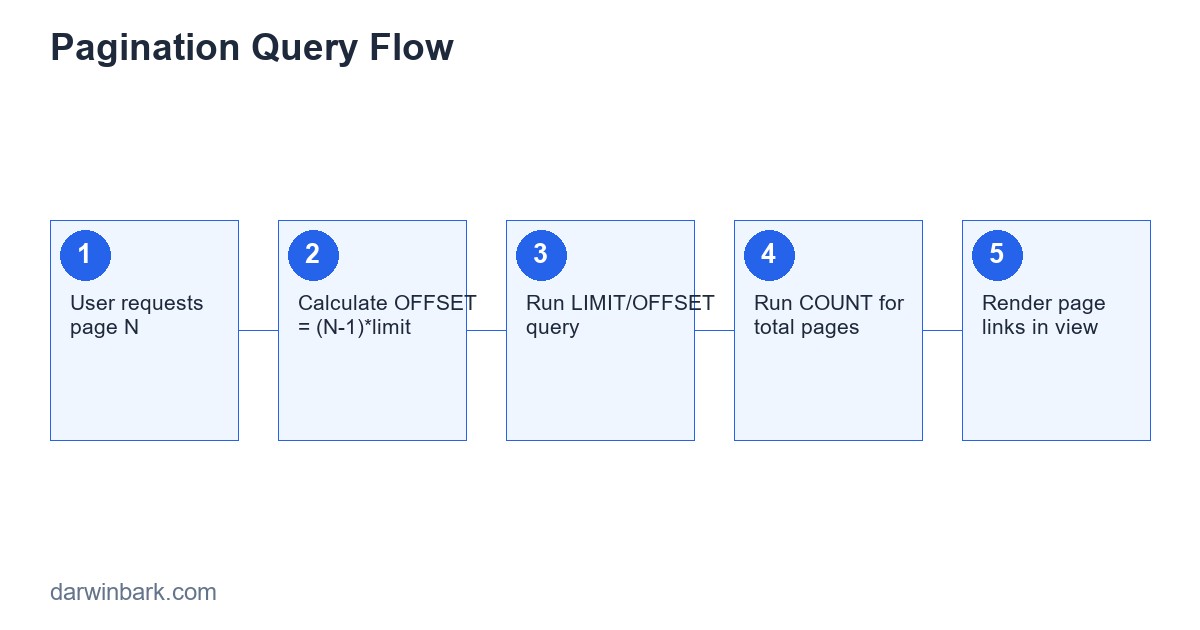
The Hidden Cost of OFFSET on Large Tables
This basic approach has a performance problem that only becomes visible at scale: MySQL's OFFSET does not skip rows for free — it still has to scan through and discard every row before the offset point. LIMIT 20 OFFSET 100000 means the database reads through 100,000 rows just to throw them away before returning the 20 you actually wanted. On a small table this is invisible; on a large one, deep pages get progressively slower the further into the dataset you go.
Cursor-Based (Keyset) Pagination
The fix for large datasets is cursor-based pagination: instead of "skip N rows," you ask "give me rows after the last one I saw," using an indexed column (typically the primary key or a timestamp) as the cursor.
$lastId = $_GET['after'] ?? null;
if ($lastId) {
    $stmt = $pdo->prepare('SELECT * FROM products WHERE id < :lastId ORDER BY id DESC LIMIT :limit');
    $stmt->bindValue('lastId', $lastId, PDO::PARAM_INT);
} else {
    $stmt = $pdo->prepare('SELECT * FROM products ORDER BY id DESC LIMIT :limit');
}
$stmt->bindValue('limit', $perPage, PDO::PARAM_INT);
$stmt->execute();
$products = $stmt->fetchAll();
This query performs consistently regardless of how deep into the dataset you are, because the database can jump directly to the cursor position using an index, rather than scanning and discarding everything before it. The tradeoff is that cursor-based pagination does not support jumping directly to an arbitrary page number ("go to page 47") the way offset pagination does — it naturally supports "next" and "previous" navigation, which is exactly the pattern infinite-scroll feeds and most mobile app lists actually use.
Choosing Between the Two Approaches
| Approach | Best For | Limitation |
|---|---|---|
| Offset pagination | Small-to-medium tables, traditional numbered page links | Gets slower on deep pages of large tables |
| Cursor pagination | Large tables, infinite scroll, real-time feeds | Cannot jump directly to an arbitrary page number |
Indexing for Pagination Performance
Both approaches depend on the ORDER BY column being indexed. Pagination ordered by an unindexed column forces MySQL to sort the entire result set before it can apply any limit, which defeats much of the performance benefit regardless of which pagination style you use. Always confirm with EXPLAIN that the query is actually using an index for the sort, not falling back to a full table scan and filesort.
Handling Concurrent Changes Between Pages
With offset pagination specifically, if a row is inserted or deleted while a user is paging through results, rows can shift between pages — a user might see the same row twice, or skip one entirely, between page loads. This is rarely a critical bug for a typical product listing, but it matters for anything where consistency across a paginated export actually counts (financial records, for example), where cursor-based pagination against a stable sort key avoids the issue more reliably.
Building the Pagination UI
<nav>
  <?php if ($page > 1): ?>
    <a href="?page=<?= $page - 1 ?>">Previous</a>
  <?php endif; ?>
  <span>Page <?= $page ?> of <?= $totalPages ?></span>
  <?php if ($page < $totalPages): ?>
    <a href="?page=<?= $page + 1 ?>">Next</a>
  <?php endif; ?>
</nav>
Always validate the requested page number server-side — a negative page number, or one far beyond the actual total, should not be allowed to produce an invalid offset or an unnecessarily expensive query.
Pagination and SEO
For paginated content that should be indexable (blog archives, product category pages), each page needs its own crawlable URL (not one that depends purely on JavaScript state) and ideally a canonical tag pointing to itself, so search engines treat each page as distinct content rather than duplicate variations of page one.
Frequently Asked Questions
Is it ever fine to just load everything and paginate in JavaScript instead?
Only for genuinely small datasets (a few hundred rows at most) where the cost of sending it all to the browser is negligible. For anything larger, paginating at the database query level is both faster and lighter on bandwidth.
How do I get an accurate total count without it slowing down every page request?
For very large tables, an exact COUNT(*) on every page load can itself become a performance bottleneck. Common mitigations include caching the count for a short period, using an approximate count where slight inaccuracy is acceptable, or removing the "total pages" UI element entirely in favor of just "next/previous" for very large datasets.
Does Laravel handle this for me?
Laravel's Eloquent paginate() method handles offset-style pagination (including the count query and link generation) out of the box, and cursorPaginate() provides the keyset approach directly, without needing to hand-roll either from scratch.
Conclusion
Basic LIMIT/OFFSET pagination is fine until a table grows large enough for the skipped-rows cost to become visible — at that point, cursor-based pagination is the standard fix, trading "jump to any page" for consistent performance regardless of depth. If your application's listing pages are slowing down as your data grows, we can help fix it.
Combining Pagination With Filtering and Sorting
Real listing pages rarely paginate a static, unfiltered dataset — users filter by category, search by keyword, and sort by different columns, all of which need to combine correctly with pagination rather than being implemented as separate, conflicting code paths:
$where = []; $params = [];
if (!empty($_GET['category'])) {
    $where[] = 'category_id = :category';
    $params['category'] = $_GET['category'];
}
$whereSql = $where ? 'WHERE ' . implode(' AND ', $where) : '';

$sql = "SELECT * FROM products $whereSql ORDER BY created_at DESC LIMIT :limit OFFSET :offset";
$stmt = $pdo->prepare($sql);
foreach ($params as $k => $v) { $stmt->bindValue($k, $v); }
$stmt->bindValue('limit', $perPage, PDO::PARAM_INT);
$stmt->bindValue('offset', $offset, PDO::PARAM_INT);
$stmt->execute();
The count query for total pages needs the exact same WHERE conditions applied, or the displayed total page count will not match what the filtered result set actually contains — a common, confusing bug where pagination links go to pages that turn out empty once a filter is active.
Case Study: A Listing Page That Slowed Down as the Catalog Grew
A product listing page performed fine at launch with a few hundred products, then degraded noticeably as the catalog grew past tens of thousands — specifically on later pages, while page one stayed fast. The cause was exactly the OFFSET cost covered earlier: deep pages were scanning and discarding enormous numbers of rows before returning results. Switching the "next page" links to cursor-based pagination, while keeping page one's direct-jump behavior for the common case, resolved the slowdown without a full rewrite of the listing feature.
Glossary
- Filesort — MySQL sorting rows outside of an index, visible in
EXPLAINoutput, often a sign the ORDER BY column needs an index. - Keyset/cursor pagination — pagination based on "rows after this known position" rather than a numeric offset, avoiding the cost of scanning skipped rows.
- N+1 query problem — a related performance issue where a paginated list triggers one extra query per row (commonly for a related record), multiplying load unnecessarily; solved with eager loading or a join.
Frequently Asked Questions
Is there a way to get exact pagination with cursor-based pages?
Cursor pagination intentionally trades away "exact page N" navigation for consistent performance. If exact page jumping is a hard requirement, offset pagination with proper indexing is usually the more practical choice despite its deep-page cost.
Does adding an index always fix slow pagination?
An index on the ORDER BY column helps significantly, but does not eliminate the fundamental OFFSET scan-and-discard cost on very deep pages — it helps the sort, not the skip. For genuinely large tables, cursor pagination remains the more complete fix.
How many rows per page is reasonable?
Common defaults range from 10-50 depending on content type; the right number balances how many requests a user needs to browse a full dataset against how much data and rendering work each individual page requires.
Step-by-Step: Migrating an Existing Listing Page to Cursor Pagination
Moving a live, offset-paginated feature to cursor-based pagination without breaking existing bookmarked or shared page links requires a careful sequence:
- Add the new cursor-based endpoint alongside the existing one — do not remove offset pagination immediately; run both in parallel.
- Ensure the sort column is indexed — cursor pagination depends entirely on an efficient lookup by that column, so confirm with
EXPLAINbefore switching any traffic over. - Update the "next page" link generation — instead of incrementing a page number, the next link now carries the last-seen row's cursor value as a query parameter.
- Decide what happens to "jump to page N" UI — either remove it, or keep a separate, less-frequently-used offset-based path specifically for direct page jumps while infinite-scroll or next/previous browsing uses the cursor path.
- Monitor query performance on both paths after deployment to confirm the expected improvement on deep pages actually materializes in production, not just in local testing with a smaller dataset.
Comparing Pagination Strategies in Practice
| Strategy | Good Fit | Watch Out For |
|---|---|---|
| Offset (LIMIT/OFFSET) | Admin panels, small catalogs, numbered page navigation | Degrades on deep pages of large tables |
| Cursor (keyset) | Infinite scroll, activity feeds, large datasets | No direct "jump to page 50" support |
| Hybrid (offset for shallow pages, cursor for deep) | Large catalogs that still want page-number UI for early pages | More implementation complexity to maintain two code paths |
Pagination in APIs vs Pagination in Server-Rendered Pages
Everything covered so far applies to both contexts, but APIs typically also need to communicate pagination metadata explicitly in a structured way, since there is no rendered "Next" link a client can simply click — a JSON response commonly includes a metadata block with the current page, total pages, total count, and direct links or cursors for the next and previous pages, so any client (a mobile app, a frontend framework, another service) can build its own navigation without guessing the underlying query structure.
Caching Paginated Results
Paginated listing pages are often strong caching candidates, particularly for content that does not change every second — a blog archive's page 5 from five minutes ago is very likely identical to page 5 right now. Caching rendered pages or API responses keyed by their exact query parameters (page number, filters, sort order) can remove a large share of repeated database load for popular listing pages, with a short cache lifetime or explicit invalidation when new content is added.
Final Checklist Before Shipping a Paginated Feature
- The ORDER BY column used for pagination is properly indexed, confirmed with EXPLAIN
- The total count query (if used) applies the exact same filters as the main query
- Page number input is validated and clamped to a sane range, not trusted directly from user input
- For genuinely large tables, cursor-based pagination has been considered, not just defaulted to OFFSET out of habit
- Pagination state is reflected in the URL (not only in JavaScript memory) so links remain shareable and bookmarkable
Pagination for Search Results Specifically
Search results introduce an additional wrinkle beyond standard listing pagination: relevance ranking. Unlike a simple ORDER BY created_at, search results are typically ordered by a relevance score computed by the search engine (whether that is MySQL full-text search, or a dedicated search service like Elasticsearch or Algolia), and that score can be more expensive to compute consistently across paginated requests than a straightforward indexed column. For search specifically, many implementations cap the maximum number of paginated results returned (showing "1000+ results" rather than allowing a user to page indefinitely through tens of thousands of matches), both for performance and because relevance ranking becomes a less useful signal very deep into a result set regardless.
Mobile App Considerations for Pagination
Mobile apps consuming a paginated API often implement infinite scroll rather than numbered pages, which maps naturally onto cursor-based pagination — each scroll-triggered request asks for "the next batch after the last item currently shown," exactly the cursor pattern covered earlier. Mobile clients also need to handle the case where the underlying data changed between page loads (new items added, items removed) gracefully, typically by de-duplicating by ID on the client side rather than assuming the server's pagination guarantees a perfectly stable, non-overlapping sequence across requests separated by time.
A Worked Example: How a Blog Archive Page Actually Scales
Consider a blog archive page that starts with a few dozen posts and a simple offset-paginated query, and trace how its needs change as content grows over several years. At launch, LIMIT 10 OFFSET 0 through roughly page five performs identically fast regardless of which page a visitor requests, because the table is small enough that scanning past any offset costs almost nothing measurably. Two years and a thousand posts later, the same query pattern on page eighty is now visibly slower than page one, exactly the OFFSET-scan cost described earlier in this guide, though it may take a while for anyone to notice since deep archive pages receive far less traffic than the homepage or recent posts. The practical fix applied at this point is rarely a full rewrite: the team adds a cursor-based "next/previous" navigation specifically for the archive's deep pagination, while leaving the first few pages (the ones almost all real traffic actually visits) on the simpler, already-working offset implementation, since rewriting working, low-risk code purely for a performance problem that mostly affects rarely-visited pages would not have been the best use of the team's time. This kind of selective, traffic-informed optimization — fixing the part of the system that the data shows actually matters, rather than rewriting everything uniformly — is a common and reasonable pattern in real performance work, distinct from the more theoretical "always use cursor pagination for large tables" framing that a tutorial in isolation might suggest.
Testing Pagination Logic
Off-by-one errors are the single most common pagination bug — a page boundary that drops a row, or duplicates one across two pages. Tests should specifically check the boundaries:
public function testLastPageReturnsRemainderNotFullPage()
{
    // 25 total rows, 10 per page -> page 3 should have exactly 5 rows
    $results = $this->paginator->paginate(page: 3, perPage: 10);
    $this->assertCount(5, $results->items());
}

public function testNoRowIsSkippedOrDuplicatedAcrossPages()
{
    $allIds = [];
    foreach (range(1, 5) as $page) {
        $allIds = array_merge($allIds, $this->paginator->paginate($page, 10)->pluck('id')->toArray());
    }
    $this->assertEquals(range(1, 45), $allIds);
}
That second test is the one that actually catches cursor-pagination bugs caused by sorting on a non-unique column — exactly the failure mode described earlier in this guide, where rows with identical timestamps can be skipped or repeated depending on how the database happens to order ties.
Pagination and Search Engines
Paginated list pages are common SEO mistakes waiting to happen. Each page of results is a distinct URL with mostly similar content, which search engines can interpret as duplicate or thin content if handled carelessly. The fix is straightforward: use rel="next" and rel="prev" link tags (or rely on Google's current guidance, which has evolved over the years) so search engines understand the pages are part of one sequence, give each page a unique but related title (e.g. "Products — Page 2 of 14"), and make sure canonical tags point to the correct paginated URL rather than collapsing everything to page one.
A Decision Checklist
Before implementing pagination on a new feature, answer these in order: Does the data change while a user might be browsing it (favor cursor pagination)? Is "jump to page 8" a real user need (favor offset pagination, or a hybrid)? Is the table large enough that OFFSET performance will matter within a year (plan for cursor pagination or keyset indexing now, not after the slowdown is reported as a bug)? Will this data ever be consumed by a mobile app or external API (favor cursor-based, token-driven pagination, which travels better across client types than page numbers)?
Final Word
Pagination looks like a solved problem because the basic version is trivial to implement and trivial to get subtly wrong. The difference between a tutorial-grade LIMIT/OFFSET query and a pagination system that holds up under real traffic, real data growth, and real concurrent writes is almost entirely in the details covered here — index design, tie-breaking on sort columns, and choosing the right pagination model for how the data actually behaves in production.
Pagination Inside an Admin Dashboard Versus a Public Feed
The right pagination approach is not universal even within one application. An admin dashboard listing orders benefits from offset pagination with page numbers — staff genuinely want to jump to "page 14" while investigating a specific order range, and the dataset, while large, is not changing every second under their feet. A public activity feed on the same platform behaves completely differently: new rows arrive constantly, users scroll rather than jump to page numbers, and showing the same post twice because of a shifted offset would be an obvious, visible bug. Treating both the same way — usually by defaulting everything to whatever the framework's pagination helper does out of the box — is how teams end up patching duplicate-row bugs in production months after a feature ships.
Combining Pagination with Filters and Sorting
Real list pages rarely paginate raw, unfiltered data — there is a status filter, a date range, a search term, a sort column, all of which need to compose correctly with the pagination itself. The query must apply every filter before the LIMIT/OFFSET or cursor condition, never after, or the page sizes will be wrong and some matching rows will be silently excluded:
$query = Product::query()
    ->when($request->category, fn($q, $cat) => $q->where('category_id', $cat))
    ->when($request->search, fn($q, $term) => $q->where('name', 'like', "%$term%"))
    ->orderBy($request->sort ?? 'created_at', 'desc');

$page = $query->paginate(20);
Equally important: any sort column offered to users needs an index, or "sort by price" on a 200,000-row table turns into a full table scan on every single page load — a performance problem that, unlike most bugs, gets worse exactly as the product succeeds and the table grows.






