
Validation Is Not Optional, Even for "Simple" Forms
Every form on a website is an invitation for arbitrary data to enter your system, and not all of that data will be well-intentioned or even well-formed. Form validation is the gatekeeping layer that decides what counts as acceptable input before it touches your database, your business logic, or anyone else's screen. Skipping it, or implementing it only on the client side, is one of the most common root causes behind both security incidents and the kind of subtle data-corruption bugs that take weeks to track down.
Client-Side vs Server-Side: What Each One Is Actually For
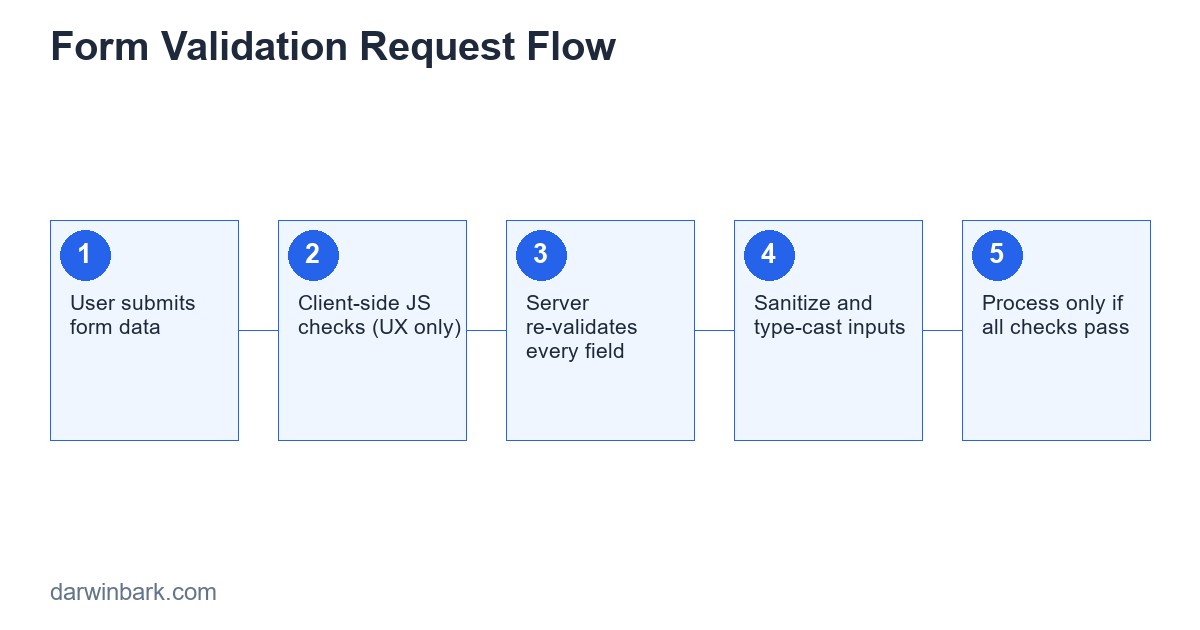
Client-side validation — HTML5 attributes like required and pattern, plus JavaScript checks — exists purely to improve the user experience. It gives instant feedback without a round trip to the server, which feels faster and friendlier. What it does not do is provide any actual security, because any HTTP request can be constructed and sent directly to your server, completely bypassing the browser, the HTML form, and any JavaScript on the page entirely. Tools that do exactly this (curl, Postman, browser dev tools, or a simple PHP script) are trivial to use.
Server-side validation is the only validation that counts as a security boundary. Every single field, every single time, regardless of what the client-side code already checked, needs to be validated again on the server before it is used for anything.
Built-In PHP Validation Tools
PHP's filter_var() function is the most direct way to validate common data formats:
$email = filter_var($_POST['email'], FILTER_VALIDATE_EMAIL);
if ($email === false) {
    $errors[] = 'Please enter a valid email address.';
}

$age = filter_var($_POST['age'], FILTER_VALIDATE_INT, [
    'options' => ['min_range' => 13, 'max_range' => 120],
]);
if ($age === false) {
    $errors[] = 'Age must be a number between 13 and 120.';
}
For anything filter_var() does not cover directly, regular expressions fill the gap — though they should be used carefully, since overly clever regex patterns are a common source of both false rejections (valid input incorrectly blocked) and, in extreme cases, a denial-of-service risk known as "catastrophic backtracking" with certain pathological patterns.
Validating Common Field Types
Email Addresses
FILTER_VALIDATE_EMAIL covers the format. If you also need to confirm the address can actually receive mail, that requires an actual verification email with a confirmation link — format validation alone cannot tell you whether an address is real or reachable.
Phone Numbers
Phone number formats vary enormously by country, which makes a single universal regex unreliable. For international forms, a dedicated library (such as libphonenumber, available via a PHP port) handles country-specific formats far more reliably than a hand-written pattern.
URLs
$url = filter_var($_POST['website'], FILTER_VALIDATE_URL);Note that this validates format, not safety — a syntactically valid URL can still point somewhere malicious, which matters if you are fetching or redirecting to user-supplied URLs (a common source of open-redirect and server-side request forgery vulnerabilities).
Dates
$date = DateTime::createFromFormat('Y-m-d', $_POST['birthdate']);
$isValid = $date && $date->format('Y-m-d') === $_POST['birthdate'];
This pattern catches a subtlety many hand-written date checks miss: PHP's date functions will often "fix" an invalid date like February 30th into March 2nd silently, rather than rejecting it, unless you explicitly compare the round-tripped value back against the original input.
Numeric Ranges and Whitelisted Values
For dropdowns, radio buttons, or any field where only a fixed set of values is valid, never trust that the submitted value matches one of the options you rendered — an attacker can submit any value directly. Always check the submitted value against the actual whitelist on the server.
$allowedSizes = ['small', 'medium', 'large'];
if (!in_array($_POST['size'], $allowedSizes, true)) {
    $errors[] = 'Invalid size selected.';
}
Sanitization Is a Different Step From Validation
Validation answers "is this data acceptable?" Sanitization answers "how do I make this data safe to use in a specific context?" They are not the same operation, and conflating them is a common source of bugs. A name field might validate as "non-empty, under 100 characters" but still needs proper escaping when it is later output into HTML (to prevent XSS) or used in a SQL query (handled by prepared statements, not by sanitizing the string yourself). Validate the data's shape and meaning at input time; handle safe output separately, in the context where it is actually used.
Building a Reusable Validation Pattern
Repeating the same validation logic across every form in a codebase is how inconsistencies creep in — one form checks email format, another forgets to. A small reusable validator class keeps rules centralized:
class Validator {
    private array $errors = [];
    public function required($value, $field) {
        if (trim((string)$value) === ''){
            $this->errors[$field][] = "$field is required.";
        }
        return $this;
    }
    public function email($value, $field) {
        if (!filter_var($value, FILTER_VALIDATE_EMAIL)) {
            $this->errors[$field][] = "$field must be a valid email.";
        }
        return $this;
    }
    public function passes(): bool {
        return empty($this->errors);
    }
    public function errors(): array {
        return $this->errors;
    }
}
This is roughly the pattern that frameworks like Laravel formalize and extend much further — with rule chaining, custom rule classes, automatic error message generation, and validation that runs consistently across an entire application instead of being reinvented per form.
Common Mistakes Beyond the Basics
- Trusting client-side validation as if it were a security boundary — the single most common and most serious mistake.
- Validating format but not business rules — an email might be correctly formatted but already registered; a discount code might be correctly formatted but expired. Format validation and business-rule validation are both necessary and often confused for each other.
- Forgetting multi-byte and unicode input — name fields that assume ASCII-only characters incorrectly reject legitimate names containing accented characters or non-Latin scripts. Use multi-byte safe functions (
mb_strlenrather thanstrlen) when measuring text length. - Inconsistent error messaging — revealing overly specific details (like "no account found with this email" on a login form) can help an attacker enumerate valid accounts; generic messages are often the safer choice on authentication forms specifically.
- Re-validating only some fields after a partial form edit — if an update endpoint allows partial updates, every field that can be changed still needs its own validation rule applied, not just the ones that were filled in during initial creation.
How Frameworks Change This Picture
Plain PHP validation, written by hand, works but requires constant discipline to apply consistently across every endpoint in a growing application. Laravel's validation system, for comparison, lets a developer declare rules in one place per request and have them enforced automatically, with consistent error responses, before the controller logic ever runs — removing an entire category of "we forgot to validate this one field" bugs that tend to show up in hand-rolled PHP over time.
Frequently Asked Questions
Is client-side validation worth implementing at all?
Yes — for user experience. Instant feedback reduces frustration and failed submissions. It just must never be treated as a substitute for server-side checks.
Should I validate on every request, even for trusted internal tools?
Yes. "Internal" tools are frequently exposed more broadly than intended over time, and validation is cheap insurance against both attackers and honest mistakes (a malformed CSV import, for example).
What is the safest way to validate file uploads as part of a form?
Check the actual file content (not just the extension), enforce size limits, and rename the file before storing it — covered in more depth in our dedicated guide on secure PHP file uploads.
How strict should email validation be?
Strict enough to catch obvious typos and malformed input, but be cautious with overly aggressive regex patterns that reject technically valid but unusual addresses. FILTER_VALIDATE_EMAIL is a reasonable, well-tested baseline for most applications.
Can validation alone prevent SQL injection?
No — validation reduces the attack surface but is not a substitute for prepared statements. Even well-validated input should still be passed through parameterized queries, never concatenated directly into SQL.
Conclusion
Good form validation is invisible when it works and obvious when it's missing — corrupted data, security incidents, and confusing bugs downstream are usually traceable back to a field that was never properly checked. The core discipline is simple even if applying it consistently takes effort: validate everything server-side regardless of client-side checks, separate validation from sanitization, and check business rules in addition to format.
If you are building a form-heavy application and want validation done right from the start rather than patched in after an incident, our team can build it properly.
Step-by-Step: Building a Complete Registration Form Validator
To see all the pieces work together, here is a full registration form handler validating name, email, password, and age in one pass:
$errors = [];
$data = [
    'name' => trim($_POST['name'] ?? ''),
    'email' => trim($_POST['email'] ?? ''),
    'password' => $_POST['password'] ?? '',
    'password_confirm' => $_POST['password_confirm'] ?? '',
    'age' => $_POST['age'] ?? '',
];

if (mb_strlen($data['name']) < 2 || mb_strlen($data['name']) > 100) {
    $errors['name'] = 'Name must be between 2 and 100 characters.';
}

$email = filter_var($data['email'], FILTER_VALIDATE_EMAIL);
if ($email === false) {
    $errors['email'] = 'Please enter a valid email address.';
} else {
    $stmt = $pdo->prepare('SELECT id FROM users WHERE email = :email');
    $stmt->execute(['email' => $email]);
    if ($stmt->fetch()) {
        $errors['email'] = 'An account with this email already exists.';
    }
}

if (strlen($data['password']) < 10) {
    $errors['password'] = 'Password must be at least 10 characters.';
} elseif ($data['password'] !== $data['password_confirm']) {
    $errors['password_confirm'] = 'Passwords do not match.';
}

$age = filter_var($data['age'], FILTER_VALIDATE_INT, ['options' => ['min_range' => 13, 'max_range' => 120]]);
if ($age === false) {
    $errors['age'] = 'Age must be a number between 13 and 120.';
}

if (empty($errors)) {
    $stmt = $pdo->prepare('INSERT INTO users (name, email, password_hash, age) VALUES (:name, :email, :hash, :age)');
    $stmt->execute([
        'name' => $data['name'],
        'email' => $email,
        'hash' => password_hash($data['password'], PASSWORD_DEFAULT),
        'age' => $age,
    ]);
}
Notice that the email uniqueness check and the password-confirmation check are business-rule validations, not format validations — both categories are necessary, and skipping either one leaves a real gap. The age field reuses the exact filter_var() range pattern shown earlier, demonstrating how a small set of validation primitives covers most form fields once you know the pattern.
Validating Nested and Array Input
Forms that submit multiple items at once — an order with several line items, a settings page with a list of notification preferences — need every entry in the array validated individually, not just the array's presence:
foreach ($_POST['items'] as $index => $item) {
    if (!filter_var($item['quantity'], FILTER_VALIDATE_INT, ['options' => ['min_range' => 1]])) {
        $errors["items.$index.quantity"] = "Item $index has an invalid quantity.";
    }
    if (!filter_var($item['product_id'], FILTER_VALIDATE_INT)) {
        $errors["items.$index.product_id"] = "Item $index has an invalid product.";
    }
}
A common mistake here is validating only the first item or the array structure overall, while leaving individual entries unchecked — which an attacker can exploit by submitting a well-formed first item followed by malformed or malicious entries further into the array.
AJAX Validation Without Duplicating Logic
A common pattern for instant-feedback forms is calling the same server-side validation endpoint via AJAX as the field loses focus, rather than maintaining a separate, duplicate set of JavaScript validation rules that can drift out of sync with the real server-side rules over time:
fetch('/validate-field', {
    method: 'POST',
    body: JSON.stringify({ field: 'email', value: emailInput.value }),
    headers: { 'Content-Type': 'application/json' }
}).then(res => res.json()).then(result => {
    showFieldError('email', result.error);
});
The server endpoint runs the exact same validation function used on final form submission, just scoped to one field, which guarantees the instant feedback the user sees during typing always matches what will actually happen when they submit.
Testing Your Validation Logic
Validation rules are exactly the kind of code that benefits from automated tests, because the bugs that matter are almost always at the boundaries: what happens with an empty string, a string of only whitespace, the maximum allowed length plus one character, a negative number where only positive is expected, or a value with the right type but an out-of-range value. A short PHPUnit test covering those boundary cases for each validation rule catches regressions that manual testing reliably misses once a codebase has more than a handful of forms.
More Frequently Asked Questions
Should validation error messages be different for different languages/locales?
Yes, if the site serves multiple languages — validation messages are user-facing text and should go through the same translation system as the rest of the interface, not be hardcoded in English inside validation logic.
How do I validate a field that depends on another field's value?
Conditional validation (for example, a "company name" field that becomes required only if "account type" is set to "business") needs to run after the dependent field is read, checking the condition explicitly rather than relying on a single static rule set applied uniformly to every field.
What is the safest way to handle validation errors in an API response?
Return a consistent structure (commonly a JSON object mapping field names to error messages) with an appropriate HTTP status code, typically 422 Unprocessable Entity, rather than 200 with an error flag buried in the body, which API consumers can easily miss.
Is it bad practice to validate the same field twice on client and server with different rules?
It is risky specifically when the rules diverge — a client-side check that is slightly stricter or looser than the server-side rule creates a confusing experience where a field passes client validation but fails on submit, or vice versa. Keep the rule definitions as close to identical as practical between the two layers.
Do file uploads need to go through the same validator pattern as text fields?
The validation goal is the same (reject anything that does not meet defined rules) but the checks themselves are different — covering file type verification, size limits, and safe storage rather than string length or format, as covered in our dedicated guide on secure PHP file uploads.
Validating International and Unicode Input
Forms built and tested only against English, Latin-alphabet input frequently break the moment a real international user fills them in. Name fields that use a regex like ^[A-Za-z ]+$ silently reject legitimate names containing accented characters, apostrophes, hyphens, or non-Latin scripts entirely — a real and common complaint from users with names a developer simply did not think to test against. The safer default is a permissive check (non-empty, reasonable maximum length using mb_strlen rather than strlen so multi-byte characters are counted correctly) rather than an restrictive whitelist of allowed characters.
Postal codes and address formats vary by country in ways that make a single validation pattern unreliable globally — a US ZIP code, a UK postcode, and a Japanese postal code follow entirely different structures. For an internationally-facing form, either validate format per-country based on a selected country field, or validate more loosely and rely on an actual shipping/address verification API for anything where correctness genuinely matters (checkout flows, for example).
Building Custom Validation Rules
Beyond format checks, real applications often need business-specific rules: password strength beyond simple length, uniqueness checks against the database, or cross-field consistency rules. Extending the reusable validator pattern shown earlier to support custom rule closures keeps these business rules just as centralized as the basic ones:
class Validator {
    private array $errors = [];
    private array $data;

    public function __construct(array $data) {
        $this->data = $data;
    }

    public function custom(string $field, callable $rule, string $message): self {
        if (!$rule($this->data[$field] ?? null)) {
            $this->errors[$field][] = $message;
        }
        return $this;
    }
}

$validator = new Validator($_POST);
$validator->custom('password', function ($value) {
    return preg_match('/[A-Z]/', $value) && preg_match('/[0-9]/', $value) && strlen($value) >= 10;
}, 'Password must be at least 10 characters and include an uppercase letter and a number.');
This approach scales cleanly to genuinely complex business rules — "this promo code is valid only for first-time customers," "this username is not on our reserved-words list," "this date must fall on a weekday" — without each one becoming a one-off, hard-to-find conditional buried somewhere in a controller.
How Established Validation Libraries Compare
| Approach | Strengths | Tradeoffs |
|---|---|---|
| Hand-written (filter_var + custom checks) | No dependencies, full control | Easy to apply inconsistently across a growing codebase |
| Respect/Validation (standalone library) | Large built-in rule set, framework-agnostic | Another dependency to keep updated |
| Laravel Validator | Deeply integrated with forms, requests, and error display | Tied to using the Laravel framework |
| Symfony Validator | Annotation/attribute-based rules directly on data objects | More setup overhead for small projects |
For a small, standalone PHP project, hand-written validation following the patterns in this guide is perfectly reasonable. For anything growing past a handful of forms, adopting a framework's validation system (or a standalone library) earns back its overhead quickly in consistency and reduced bugs.
Final Checklist Before Shipping a Form
- Every field is validated server-side, regardless of any client-side checks already in place
- Whitelisted/enum fields (dropdowns, radio buttons) are checked against the actual allowed list server-side, not assumed safe because the HTML only rendered valid options
- Business-rule validation (uniqueness, expiry, ownership) is checked in addition to format validation
- Multi-byte safe functions are used anywhere text length matters
- Array/nested input has every individual entry validated, not just the top-level structure
- Error messages avoid leaking information useful to an attacker (especially on login/auth forms)
Case Study: Fixing a Real Vulnerable Contact Form
A recurring pattern in site audits: a contact form that has clearly "worked" for years, never flagged as broken, while quietly missing almost every validation practice covered in this guide. A typical before-state looks like this — the email field only checked client-side with an HTML5 type="email" attribute and nothing on the server, the message field accepted unlimited length with no server-side cap, and the submitted name was inserted directly into a "thank you" confirmation page without any output escaping at all.
None of this shows up in normal use, because normal visitors fill out forms exactly as expected. The problems surface only when someone deliberately abuses the gap: submitting a name field containing a script tag results in that script executing on the confirmation page for anyone who views it (a stored XSS vulnerability), bypassing the email field entirely via a direct POST request lets spam and junk data flow straight into the database, and an unbounded message field becomes an easy way to fill a database or trigger downstream storage issues.
The fix mirrors the guide directly: validate every field server-side regardless of the client-side type="email" attribute, cap message length explicitly and enforce it server-side, and escape all user-supplied values before they are echoed back into any HTML page, including confirmation screens — a step that is just as easy to forget as validation itself, and just as damaging when skipped.
Glossary of Terms Used in This Guide
- Validation — checking that input meets defined rules (format, range, required) before it is accepted.
- Sanitization — transforming data to make it safe for a specific output context (HTML, SQL, a shell command), a separate step from validation.
- Whitelist validation — checking a value against a fixed, known-safe set of allowed values, generally safer than trying to blacklist "bad" patterns.
- Stored XSS — a cross-site scripting vulnerability where unescaped malicious input is saved and later rendered to other users, as opposed to reflecting it immediately back to the same submitter.
- 422 Unprocessable Entity — the HTTP status code conventionally used for "your request was understood but failed validation," distinct from a 400 (malformed request) or 500 (server error).
Like session handling, form validation is a checklist of individually simple practices — the risk is never the difficulty of any one rule, it is skipping one without noticing until it is actually exploited. If you want your existing forms reviewed, or a new system built with this handled properly from day one, get in touch for a free consultation.






