
Why "It Works on My Machine" Is Not Error Handling
Every PHP application eventually hits something unexpected: a database connection drops, an API call times out, a user uploads a file that is not actually what its extension claims. The difference between an application that degrades gracefully and one that shows a raw stack trace (or a blank white page) to a paying customer comes down entirely to how deliberately errors are handled. This guide covers PHP's actual error and exception model, not just the try/catch syntax everyone already half-knows.
Errors vs Exceptions: Two Different Mechanisms
PHP has historically had two separate mechanisms for things going wrong: traditional PHP errors (warnings, notices, fatal errors) and the exception system borrowed from object-oriented languages. Since PHP 7, most fatal errors are also represented as Error objects, which unifies the model considerably — both Exception and Error implement a common Throwable interface, so a single catch block can handle either.
try {
    $result = 10 / $divisor;
} catch (\DivisionByZeroError $e) {
    // DivisionByZeroError is a built-in Error subtype, catchable just like an Exception
    error_log($e->getMessage());
}
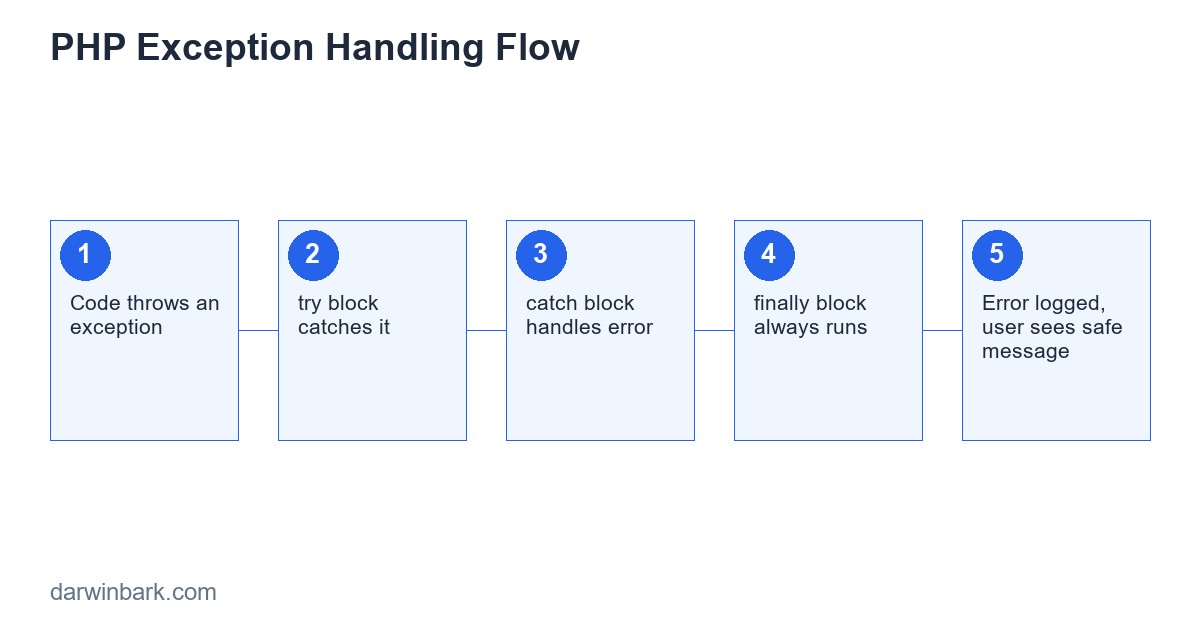
The Anatomy of try / catch / finally
try {
    $data = fetchFromExternalApi($url);
} catch (\GuzzleHttp\Exception\ConnectException $e) {
    // network-level failure
    $data = null;
} catch (\Exception $e) {
    // anything else from this block
    error_log($e->getMessage());
    $data = null;
} finally {
    // always runs, success or failure ÔÇö good for cleanup like closing a file handle
    releaseLock($lockId);
}
Catch blocks should be ordered from most specific to least specific — PHP checks them top to bottom and uses the first match, so a broad \Exception catch placed first would silently swallow more specific exception types you might have wanted to handle differently.
Custom Exception Classes
Throwing PHP's generic Exception for every failure case makes it hard to handle different failure types differently upstream. Custom exception classes let calling code catch precisely what it expects to handle:
class InsufficientStockException extends \Exception {
    public function __construct(public readonly int $productId, public readonly int $requested, public readonly int $available) {
        parent::__construct("Cannot fulfill order: requested $requested, only $available in stock.");
    }
}

try {
    $order->place();
} catch (InsufficientStockException $e) {
    return response()->json(['error' => 'out_of_stock', 'available' => $e->available], 409);
} catch (\Exception $e) {
    return response()->json(['error' => 'unexpected_error'], 500);
}
This pattern is what separates handling errors deliberately from catching everything generically and hoping the message string contains enough information to act on — brittle string-matching on exception messages is a common anti-pattern this avoids entirely.
Never Swallow Exceptions Silently
An empty catch block is one of the most damaging patterns in PHP code:
try {
    sendNotificationEmail($user);
} catch (\Exception $e) {
    // nothing here ÔÇö error disappears completely
}
This means a real failure (a misconfigured mail server, an expired API key) produces no error, no log entry, nothing — the feature simply stops working silently, and nobody finds out until a customer complains weeks later that they never received a notification. At minimum, log the exception; ideally, also surface it in a monitoring tool that alerts a developer.
Logging Errors Properly
A good log entry includes the exception message, the stack trace, and contextual information (which user, which request) needed to actually reproduce the problem later:
try {
    processPayment($order);
} catch (\Exception $e) {
    error_log(sprintf(
        "Payment failed for order #%d: %s\n%s",
        $order->id, $e->getMessage(), $e->getTraceAsString()
    ));
    throw $e; // re-throw if the caller still needs to know
}
Re-throwing after logging is often the right move — logging is for diagnosis, not for deciding whether the error is actually handled. Swallowing an exception just because you logged it is still swallowing it.
Global Exception Handlers
Every production PHP application needs a top-level handler for exceptions that escape every other catch block, so the user sees a clean error page instead of a raw stack trace (which can also leak sensitive information like file paths and database structure):
set_exception_handler(function (\Throwable $e) {
    error_log($e->getMessage());
    http_response_code(500);
    include __DIR__ . '/views/500.php';
});
Frameworks like Laravel provide this out of the box (the App\Exceptions\Handler class), but it is worth understanding what it is actually doing underneath.
Common Mistakes
- Catching Throwable or Exception too broadly as a default habit — masks bugs that should actually crash loudly in development.
- Using exceptions for normal control flow — exceptions are for genuinely exceptional conditions, not as a substitute for a simple
ifcheck on expected, common cases. - Exposing raw error messages to end users — a database error message can reveal table names and structure to anyone who triggers it; show a generic message to users and log the detailed one.
- Not setting
display_errors = Offin production php.ini — leaving this on means raw PHP errors, including file paths and code snippets, can appear directly in a production page.
Step-by-Step: Building Robust Error Handling Into a Feature
- Identify every external dependency the code touches (database, API, filesystem, email) — each is a place that can fail.
- Wrap each external call in its own try/catch, scoped narrowly rather than one giant block around unrelated operations.
- Define a custom exception type for any failure the caller needs to react to differently than a generic error.
- Log every caught exception with enough context to reproduce it.
- Decide explicitly, for each catch block: re-throw, return a fallback, or fail the whole operation ÔÇö never leave that decision implicit.
- Add a global handler as the final safety net for anything that still escapes.
Frequently Asked Questions
Should I catch Error types like TypeError in normal application code?
Generally no — a TypeError usually indicates a programming bug (wrong argument type passed), not a runtime condition to recover from. Let it surface during development and testing rather than masking it with a catch block.
Is it expensive to throw exceptions in PHP?
Throwing and catching has some overhead compared to a simple conditional, but it is small enough that it should never be the deciding factor for whether to use exceptions for genuinely exceptional cases. Using exceptions for routine control flow on a hot path is more often a design problem than a performance one.
What is the difference between Exception and Error in PHP?
Exception is meant for conditions an application can reasonably anticipate and handle (a failed API call, invalid input). Error (and its subtypes like TypeError, DivisionByZeroError) generally represents more fundamental issues, often bugs, though both implement Throwable and can technically be caught the same way.
How do I handle errors in asynchronous or queued PHP jobs?
Queue workers should catch exceptions per job so one failing job does not crash the entire worker process, log the failure with enough context to retry or investigate, and typically move the job to a "failed jobs" table or dead-letter queue rather than losing it silently.
Conclusion
Good error handling is invisible to users in the best case (the application recovers and continues) and informative to developers in the worst case (clear logs that point straight at the actual problem) — the failure mode to avoid is the application that is silent in both directions, swallowing errors users never see and developers never find out about. If you want a system built with this handled properly from the start, get in touch.
Exception Chaining: Preserving the Original Cause
When a low-level exception is caught and re-thrown as a more meaningful, higher-level one, it is easy to lose the original error in the process. PHP exceptions support a "previous" parameter exactly for this:
try {
    $pdo->exec($sql);
} catch (\PDOException $e) {
    throw new OrderProcessingException("Could not save order", previous: $e);
}
The higher-level exception is meaningful to whoever catches it; the original PDOException is still accessible via getPrevious() for logging or debugging, so nothing about the original failure is lost just because it was wrapped in a more descriptive type.
Case Study: An Error That Took Down a Checkout Flow
A common real-world pattern: a checkout process calls a third-party payment API, and a single unhandled exception from that call — a timeout, a malformed response — propagates all the way up and crashes the entire request with a blank page, after the customer's card may have already been charged. The fix is not exotic: wrap the payment call specifically, catch its specific exception types, and have an explicit plan for "payment API said something unexpected" that does not leave the order in an ambiguous state. The lesson generalizes: any external call (payment, email, third-party API) needs its own deliberate failure plan, not a hope that nothing ever goes wrong with it.
Glossary
- Throwable — the common interface both Exception and Error implement in PHP, allowing a single catch block to handle either.
- Stack trace — the sequence of function calls that led to where an exception was thrown, essential for debugging but never safe to show directly to end users.
- Global exception handler — a catch-all registered with
set_exception_handler()for anything that escapes every other try/catch in the application.
Frequently Asked Questions
Should I log every caught exception, even minor ones?
Log enough to investigate later, but distinguish severity — a failed optional feature (like a non-critical third-party widget) does not need the same alerting urgency as a failed payment. Most logging libraries support severity levels (debug, warning, error, critical) specifically for this.
What is the difference between a checked and unchecked exception, and does PHP have both?
PHP does not enforce checked exceptions (where the compiler forces you to handle or declare them) the way Java does — every exception in PHP is effectively "unchecked," meaning discipline about handling them comes from code review and testing rather than the language forcing it.
Is it bad practice to throw an exception from a constructor?
No — it is often the correct way to enforce that an object cannot exist in an invalid state. A constructor that detects missing required data should throw rather than silently constructing a broken object that fails confusingly later.
Step-by-Step: Building a Complete Error-Handling Layer for an Application
Beyond individual try/catch blocks, a properly error-handled application follows a consistent layered approach from the moment a request comes in to the moment a response goes out:
- Entry point handler — a single global exception handler registered once, catching anything that escapes every other layer, logging it, and returning a generic safe response.
- Domain-specific exceptions per feature area — custom exception classes for payments, orders, authentication, each carrying exactly the context that area needs (an order ID, a payment gateway response code) without leaking implementation details to unrelated code.
- Boundary catches at integration points — every external call (database, third-party API, filesystem, email) wrapped at the point it is made, translating low-level failures (a cURL timeout, a PDOException) into the application's own domain exceptions before they propagate further.
- Consistent logging format — every caught exception logged with the same structure (timestamp, exception class, message, relevant IDs, stack trace) so logs are searchable and comparable across different parts of the application.
- User-facing translation layer — a mapping from internal exception types to safe, user-appropriate messages, so a
DatabaseConnectionExceptionbecomes "We're experiencing technical difficulties, please try again" rather than the raw connection string and error code reaching the browser.
Skipping the middle layers and relying purely on the global handler technically "works" in that nothing crashes unhandled, but it means every failure looks the same to monitoring and to users — a payment failure and a typo in a URL parameter both just produce "something went wrong," which makes diagnosing real production issues far slower than it needs to be.
Comparing Error-Handling Approaches Across Common Scenarios
| Scenario | Weak Approach | Robust Approach |
|---|---|---|
| Third-party API timeout | Uncaught exception crashes the request | Caught specifically, retried once, falls back gracefully with logging |
| Invalid user input reaching business logic | Generic Exception thrown deep in the code | Caught at the validation layer before reaching business logic at all |
| Database connection lost mid-request | Raw PDOException message shown to user | Caught, logged with context, generic message shown, alert triggered |
| Unexpected null value from an optional field | Fatal TypeError crashes unrelated functionality | Defensive checks or nullable typing prevent the error before it occurs |
Error Handling in Different Layers of a Modern PHP Stack
A typical production PHP application is not just PHP code in isolation — it sits behind a web server, often a queue worker, sometimes a scheduled cron job, each with different expectations for how an unhandled error should behave. In a web request, an uncaught exception should be converted into a clean HTTP error response rather than a raw stack trace. In a queue worker processing background jobs, an uncaught exception in one job should not crash the worker process entirely, since that would stop every subsequent queued job from running; instead, the job-processing framework typically catches it, marks that specific job as failed, and continues processing the next one. In a scheduled cron task, an uncaught exception should be logged and ideally alert someone, since there is no user watching a browser tab to notice the failure happened at all. Building a single, one-size-fits-all error handler and assuming it covers all three contexts equally is a common gap — each context needs its own deliberate "what happens when this fails" answer.
Monitoring and Alerting on Errors in Production
Logging errors to a file is the minimum, but a file nobody reads is barely better than not logging at all. Tools like Sentry, Bugsnag, or a simple alerting rule on log aggregation (triggering a Slack or email alert when error rate crosses a threshold) close the loop between "an error happened" and "a person who can fix it finds out promptly." For a small business application, even a simple email alert on any 500-level error in production is a meaningful improvement over relying on users to report problems themselves, since most users who hit an error simply leave rather than filing a bug report.
Final Checklist Before Shipping Error Handling for a New Feature
- Every external call (database, API, filesystem, email) is wrapped with a specific catch, not left to the global handler by default
- Custom exception types exist for failure modes the calling code actually needs to react to differently
- Nothing sensitive (stack traces, database details, internal file paths) is ever shown directly to end users in production
- Every caught exception is either logged, re-thrown, or explicitly and deliberately ignored with a comment explaining why — never silently swallowed by accident
- A global handler exists as the final safety net for anything unexpected that still escapes every other layer
A Closer Look at PHP's Built-In Error Reporting Configuration
Before any custom exception handling comes into play, PHP itself has a set of configuration directives controlling what happens with traditional errors (as opposed to thrown exceptions): error_reporting controls which error levels are reported at all, display_errors controls whether they appear directly in the response, and log_errors controls whether they are written to a log file. The standard production configuration sets display_errors to off (so nothing leaks to users) and log_errors to on with a defined error_log path (so nothing is lost either) — a surprisingly common misconfiguration is leaving the development defaults (display_errors = On) active on a live server, which has been the source of real information disclosure incidents where database credentials or file paths appeared directly in a public-facing error page.
Development environments benefit from the opposite configuration — display_errors on, full error reporting enabled — specifically so problems surface immediately during development rather than being silently logged somewhere a developer is not actively watching. Maintaining genuinely different configurations between environments, rather than one setting used everywhere "to keep things simple," is what makes both goals achievable at once.
Error Handling and Backward Compatibility When Upgrading PHP Versions
PHP version upgrades have periodically changed how certain errors behave — notably, several conditions that used to produce a silent warning or notice in older PHP versions now throw a proper Error in modern PHP, including things like accessing an undefined array key in certain contexts or calling a method on null. Code written years ago, before these changes, can start throwing fatal errors after an upgrade where it previously just emitted a warning and continued running with a null or empty value. This is one of the more common sources of "everything broke after the PHP upgrade" incidents, and it is a strong argument for running a full test suite (or at minimum a thorough manual pass through key flows) immediately after any PHP version upgrade, rather than assuming version compatibility based on the changelog alone.
A Worked Example: Tracing One Failure Through Every Layer
To make the layered approach concrete, consider a single failure traveling through a checkout feature from the moment it occurs to the moment a developer fixes it. A payment gateway times out mid-request. At the integration boundary, the code catches the specific timeout exception from the HTTP client library being used to call the gateway, not a generic catch-all. That boundary code translates it into a domain-specific PaymentGatewayUnavailableException, attaching the order ID and a truncated version of the gateway response for context, and chains the original low-level exception as the "previous" cause so nothing is lost. This domain exception propagates up to the checkout Controller, which catches that specific type (and only that type, not a broad Exception catch that would also swallow unrelated bugs), logs it with full context through the application's standard logging format, and returns a response telling the customer their payment could not be processed and to try again shortly, without ever exposing the gateway's raw response or internal order ID structure. Meanwhile, the logged entry — structured, searchable, with the order ID and original exception chain intact — lets a developer reviewing logs the next morning immediately see how many checkouts were affected, during what time window, and confirm from the chained original exception that the root cause was the gateway, not a bug in the checkout code itself. Every piece of the error-handling architecture discussed throughout this guide exists specifically to make this kind of trace possible without guesswork.
Testing These Patterns: How You Would Catch Regressions
Code without tests is code nobody is confident changing. For exception handling specifically, the tests that matter most are the unhappy-path ones: feed the function a missing file, a disconnected database, a malformed input, and assert that the *correct* exception type comes out, with the *correct* message, and that nothing leaks past the boundary that should have caught it.
public function testInvalidEmailThrowsValidationException()
{
    $this->expectException(ValidationException::class);
    $this->expectExceptionMessage('email is invalid');
    $validator = new UserValidator();
    $validator->validate(['email' => 'not-an-email']);
}

public function testDatabaseDownThrowsRepositoryException()
{
    $repo = new UserRepository($this->brokenPdoMock());
    $this->expectException(RepositoryException::class);
    $repo->find(1);
}
A test suite that only exercises the happy path gives a false sense of safety. The error paths are exactly the code that runs under the worst conditions — a flaky network, a malicious input, a server under load — and those are precisely the conditions a manual click-through during development never reproduces.
A Short History: Why PHP Error Handling Looks the Way It Does
Older PHP code (anything written before PHP 5.something, and plenty written after out of habit) leans on trigger_error() and @ error suppression instead of exceptions. trigger_error() raises an E_USER_WARNING or similar that, by default, just prints a message and keeps running — there is no structured way to catch it and react, no stack unwinding, no way to attach extra context. The @ operator silences errors entirely, which is almost always worse than handling them, since the failure still happened, it is simply now invisible.
Exceptions were not new to PHP 5 — the language added proper exception support specifically because the older error model could not express "this failed, and here is everything the caller needs to know about why" in a structured, catchable way. Modern PHP code should not use trigger_error() for application logic; reserve it, if at all, for truly informational notices that nothing needs to react to programmatically.
One More Thing Worth Saying Plainly
Good error handling is invisible when things go right and obviously correct when things go wrong — a user sees a clear, actionable message instead of a blank page; a developer sees a precise stack trace and a logged context instead of "Fatal error" with no further information; an on-call engineer gets paged for things that actually need a human, not for every transient blip. None of this is exotic engineering. It is mostly discipline: catch what you can recover from, let everything else propagate, log with context, and never show a user something they cannot act on.






