Why Password Reset Is Harder Than It Looks
A password reset feature looks simple on paper: user requests a reset, gets an email, sets a new password. In practice, this flow is one of the most attacked parts of any authentication system, because it is a deliberate, intended way to bypass the normal login check — which means every shortcut taken while building it becomes a potential way for an attacker to take over an account without ever knowing the original password.
The Insecure Versions to Avoid
Security questions ("What is your mother's maiden name?") are weak because answers are often guessable, discoverable through social media, or simply forgotten by the legitimate user. Emailing the user's existing password directly is worse still — it means the password was stored in a reversible form rather than properly hashed, which is itself a serious problem regardless of the reset flow. The standard, secure pattern instead uses a one-time, time-limited token sent via email, which is what this guide builds.
Step 1: Requesting a Reset
$email = filter_var($_POST['email'], FILTER_VALIDATE_EMAIL);
$user = findUserByEmail($email);

// Always respond the same way whether or not the user exists ÔÇö
// revealing "no account found" lets an attacker enumerate valid emails
if ($user) {
    $token = bin2hex(random_bytes(32));
    $hashedToken = hash('sha256', $token);
    savePasswordResetToken($user->id, $hashedToken, expiresAt: time() + 3600);
    sendPasswordResetEmail($user->email, $token);
}

echo 'If an account exists for that email, a reset link has been sent.';
Two details matter here beyond the obvious: the response message is identical whether the email exists or not (preventing account enumeration), and the token stored in the database is a hash of the actual token, not the token itself — so a database leak alone does not hand out usable reset tokens, the same principle as never storing plain-text passwords.
Step 2: Generating a Genuinely Unguessable Token
The token must come from a cryptographically secure random source, not from something like uniqid() or rand(), both of which are predictable enough to be brute-forced or guessed under the right conditions.
$token = bin2hex(random_bytes(32)); // 64 hex characters, cryptographically secureStep 3: The Reset Link and Expiry
The email contains a link with the raw token as a query parameter: https://example.com/reset-password?token=.... On the receiving end, the raw token from the URL is hashed the same way and compared against the stored hash:
$token = $_GET['token'] ?? '';
$hashedToken = hash('sha256', $token);
$resetRecord = findValidResetToken($hashedToken);

if (!$resetRecord || $resetRecord->expires_at < time()) {
    die('This password reset link is invalid or has expired.');
}
An expiry of 30-60 minutes is a reasonable default — long enough for a user to receive and click the email under normal circumstances, short enough to limit how long a leaked or intercepted link remains exploitable.
Step 4: Setting the New Password
$newPassword = $_POST['password'];
if (strlen($newPassword) < 10) {
    die('Password must be at least 10 characters.');
}

updateUserPassword($resetRecord->user_id, password_hash($newPassword, PASSWORD_DEFAULT));
invalidateResetToken($resetRecord->id); // critical ÔÇö token must not be reusable
invalidateAllExistingSessions($resetRecord->user_id); // log out everywhere, in case the account was compromised
Invalidating the token immediately after use prevents the same reset link being used twice, including by an attacker who intercepted the email after the legitimate user already used it. Invalidating existing sessions matters specifically because a password reset is often triggered in response to a suspected compromise — leaving old sessions alive defeats much of the point.
Rate Limiting the Request Endpoint
Without a limit, the reset-request endpoint itself becomes an email-bombing tool — an attacker can repeatedly request resets for a victim's email purely to flood their inbox, or use it to probe which emails have accounts despite the identical response message, by measuring subtle timing differences. Rate-limit by both email address and requesting IP.
Common Mistakes in Password Reset Implementations
- Putting the raw token in the database instead of a hash of it, meaning a database leak directly hands out working reset tokens.
- No expiry, or an excessively long one — a reset link that works a week later is a week-long window for it to be intercepted and used by someone other than the intended recipient.
- Reusable tokens — not invalidating the token after first use.
- Revealing account existence through different response messages, timing differences, or HTTP status codes between "user exists" and "user does not exist."
- Not invalidating existing sessions after a reset, leaving any session an attacker may have already established still active.
Step-by-Step Summary
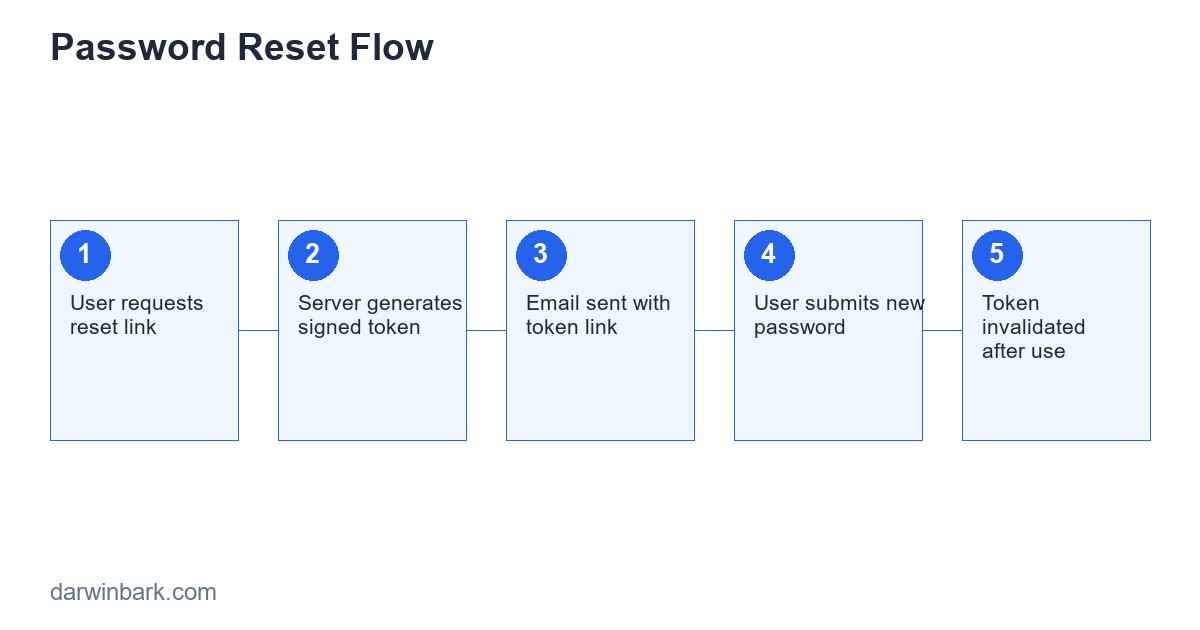
- User submits their email to request a reset.
- Server responds identically regardless of whether the account exists.
- If the account exists, generate a cryptographically random token, store only its hash with an expiry, email the raw token as a link.
- On the reset page, hash the submitted token and look up a matching, non-expired record.
- On successful new-password submission, update the password hash, invalidate the token, and invalidate existing sessions.
Frequently Asked Questions
Should the reset email reveal anything about the account, like a partial username?
Keep it minimal — confirming the account's existence and basic identity within the email itself (sent specifically to that account's address) is fine, but avoid including sensitive account details that would matter if the email itself were intercepted or sent to the wrong address by mistake.
Can I shorten the token for a better user experience, like a 6-digit code?
A short numeric code is more brute-forceable than a long random token, so if you use one, it needs strict rate limiting and a short expiry to stay reasonably safe — this is a real tradeoff between usability and the security margin a long token provides by default.
Is it necessary to log when a password reset happens?
Yes — an audit trail of password reset events (timestamp, requesting IP, whether it was completed) is valuable both for spotting abuse patterns and for investigating a reported account compromise after the fact.
What should happen to existing "remember me" tokens after a password reset?
They should be invalidated along with sessions, for the same reason: a password reset is frequently a response to suspected compromise, and a still-valid remember-me token defeats much of the protection the reset was meant to provide.
Conclusion
A password reset flow is exactly the kind of feature where every shortcut quietly reopens the door it exists to close — getting the token generation, storage, expiry, and invalidation right is not optional polish, it is the actual security of the feature. If you need an authentication system built with this handled correctly, get a free quote from our team.
What Happens If the Reset Email Never Arrives
Email deliverability issues (covered in depth in our dedicated guide on PHP email sending) directly affect password reset flows — a reset email that lands in spam, or fails silently due to a misconfigured mail server, leaves a locked-out user with no path back into their account and no visible error to explain why. Logging every reset email send attempt, and alerting on a high failure rate, catches this class of problem before it becomes a flood of support tickets from users who assume the feature is simply broken.
Case Study: A Reset Flow That Allowed Account Takeover
A pattern found in a real audit: a password reset endpoint validated the token correctly but never checked whether it had already been used, because the developer assumed the short expiry window made reuse a non-issue. An intercepted reset email (forwarded automatically by a corporate mail filter, in this particular case) was used a second time, after the legitimate user had already reset their password and assumed the matter was closed. The fix was a single missing check — marking the token as used and rejecting any subsequent attempt — but the gap had been live in production for months before being found, a useful reminder that "the expiry window is short enough" is not the same guarantee as "the token cannot be reused."
Glossary
- Account enumeration — an attack technique where differing responses (or response timing) between "account exists" and "account does not exist" let an attacker build a list of valid accounts to target.
- One-time token — a token designed to be valid for exactly one use, invalidated immediately upon use regardless of whether further uses are attempted within the expiry window.
- Session invalidation — forcibly ending all active login sessions for an account, typically done after a password change or reset as a precaution against prior compromise.
Frequently Asked Questions
Should password reset links be single-use across all of a user's devices, or per-device?
Single-use globally is the safer default — once any device successfully completes a reset, the token should be invalidated everywhere, since the new password supersedes the need for that token regardless of which device initiated the change.
Is SMS-based password reset safer than email?
Not inherently — SMS has its own risks (SIM swapping, network interception) and email-based reset with a properly random, hashed, expiring token is a well-understood, secure baseline. SMS can be a reasonable additional factor, but is not automatically superior as the sole reset channel.
What should the password reset confirmation page actually show the user?
Confirmation that the password was changed, with no sensitive account details, and ideally a prompt to log in again using the new password — since all existing sessions were just invalidated as part of the secure flow.
Step-by-Step: Adding Two-Factor Verification to the Reset Flow
For higher-security applications, a password reset can be strengthened further by requiring a second factor before the new password takes effect:
- User completes the standard email-token reset flow exactly as described earlier in this guide.
- Before finalizing the password change, if the account has 2FA enabled, require the current 2FA code (from an authenticator app) in addition to the valid reset token.
- Reject the reset if the 2FA code is missing or incorrect, even though the email token itself was valid — this specifically protects against an attacker who gained access to the email account but not the separate 2FA device.
- Notify the user via a separate channel (a security alert email, distinct from the reset email itself) once the password has actually been changed, so a legitimate user is immediately aware if a change happens that they did not initiate.
This additional step meaningfully raises the bar specifically against the most common real-world account-takeover path: an attacker who has compromised the victim's email account, which would otherwise be sufficient to complete a standard email-based reset entirely on its own.
Comparing Password Reset Approaches
| Approach | Security Level | Notes |
|---|---|---|
| Security questions | Low | Answers often guessable or discoverable; largely deprecated as a sole method |
| Email link with random token (this guide) | Good | Standard, well-understood baseline when implemented with hashing and expiry |
| Email link + required 2FA code | Strong | Protects specifically against compromised-email scenarios |
| SMS code only | Moderate | Vulnerable to SIM-swapping; reasonable as an additional factor, weaker alone |
Communicating Reset Events to the User Clearly
Beyond the technical implementation, the actual emails and pages a user sees during a reset matter for trust and for catching abuse early. The initial "reset requested" email should make clear that if the user did not request this, they can safely ignore it (since no action was taken on their account yet, just an email sent). The confirmation after a successful reset should clearly state the account's password was changed and roughly when, giving the legitimate user an immediate, clear signal if they did not actually perform that action themselves.
Handling Reset Requests for Accounts Using Social Login Only
An account created exclusively through a third-party login (Google, Facebook) typically has no password at all to reset. The reset flow needs to detect this case explicitly and respond appropriately — either explaining that the account uses social login and directing the user there, or, if the application wants to support adding a password to such an account, treating that as a distinct "set a password for the first time" flow with its own validation, rather than awkwardly forcing it through the standard reset path designed for accounts that already have one.
Final Checklist Before Shipping a Password Reset Flow
- Tokens are generated with a cryptographically secure random source, never a predictable function
- Only a hash of the token is stored in the database, never the raw token itself
- Tokens expire within a reasonably short window (30-60 minutes is a common default)
- Tokens are invalidated immediately after first successful use
- The response to a reset request is identical regardless of whether the account exists, to prevent account enumeration
- All existing sessions (and remember-me tokens) are invalidated once the password is successfully changed
- The request endpoint itself is rate-limited by both email and IP to prevent abuse
Legal and Compliance Considerations for Account Security Events
Depending on the jurisdiction and industry, password resets and account security events may fall under data protection or breach-notification requirements — for example, an unusually high volume of reset requests for a single account, or evidence that a reset was completed by someone other than the account owner, can be relevant to incident response and, in some cases, legal notification obligations. Maintaining a clear, timestamped audit log of reset events (without storing anything sensitive like the actual token or password) supports both your own investigation process and any compliance obligations that may apply to your specific business and user base.
Testing the Password Reset Flow Thoroughly
Because this flow is security-critical and exercised relatively rarely by any given user (compared to, say, login), it is also one of the features most likely to have a regression slip through unnoticed during ordinary development. Automated tests covering the full flow — requesting a reset, confirming the token is hashed in storage, confirming an expired token is rejected, confirming a used token cannot be reused, confirming sessions are invalidated afterward — catch exactly the kind of subtle regression that manual testing, focused mostly on the "happy path" of a single successful reset, tends to miss.
A Worked Example: How a Real Reset Flow Evolved After an Incident
Consider a company whose password reset flow originally followed every practice in this guide correctly at launch — random tokens, proper hashing, reasonable expiry — and was nonetheless implicated, two years later, in a wave of account takeovers traced back not to a flaw in the reset code itself but to credential-stuffing attacks against the login form, where attackers used passwords leaked from unrelated breaches elsewhere to log into accounts that happened to reuse the same password. The reset flow becomes the recovery path here: once the company detected the pattern, the fix involved force-expiring all sessions and proactively triggering password reset emails for every affected account, leaning directly on the secure reset flow already in place as an incident-response tool, not just a self-service convenience feature. This illustrates a point easy to miss when building the feature in isolation: a properly built password reset flow is not only a user convenience, it is also part of the organization's incident-response toolkit, and its reliability under that kind of pressure (sending potentially thousands of reset emails at once, all tokens behaving correctly, no rate limit accidentally blocking the legitimate mass-reset operation) is worth testing deliberately, not just assuming it will hold up because the individual-user case works correctly in normal day-to-day use.
Testing a Password Reset Flow End to End
This is a feature where manual testing alone is dangerous — it is easy to verify the happy path by hand and never check what happens to an expired or reused token, which is exactly the scenario an attacker will try.
public function testExpiredTokenIsRejected()
{
    $token = $this->createResetToken(expiresAt: now()->subHour());
    $response = $this->post('/password/reset', ['token' => $token->raw, 'password' => 'NewPass123!']);
    $response->assertStatus(400);
}

public function testUsedTokenCannotBeReusedForSecondReset()
{
    $token = $this->createResetToken();
    $this->post('/password/reset', ['token' => $token->raw, 'password' => 'First123!']);
    $second = $this->post('/password/reset', ['token' => $token->raw, 'password' => 'Second123!']);
    $second->assertStatus(400);
}

public function testRequestingResetForNonexistentEmailReturnsGenericSuccess()
{
    $response = $this->post('/password/forgot', ['email' => 'nobody@example.com']);
    $response->assertStatus(200); // same response as a real account, by design
}
That last test encodes a deliberate security decision, not an oversight: the response must look identical whether or not the email exists, otherwise the endpoint becomes a tool for checking which emails have accounts on your platform — useful to an attacker doing reconnaissance before a targeted phishing or credential-stuffing campaign.
What to Do After a Successful Reset
Three things should happen immediately once a password is successfully changed, and skipping any of them is a common gap: invalidate every other active session for that account, so a session hijacked before the reset cannot continue to be used afterward; send a confirmation email to the account ("Your password was just changed — if this wasn't you, contact support immediately"), which is often how account takeovers actually get noticed and stopped; and log the event with enough detail (timestamp, IP, user agent) to support an investigation if the user reports it was not them.
Account Lockout Versus Reset Abuse
A related but distinct concern: what stops someone from spamming the "forgot password" endpoint against a victim's email, either to harass them with emails or as a precursor to a more targeted attack? Rate limit the request endpoint itself (by IP and by email address), and consider a short cool-down between consecutive reset requests for the same account, separate from the token's own expiry window.
Closing Summary
A password reset flow sits at the intersection of usability and security in a way few other features do — it must be easy enough that a legitimate user who forgot their password can recover access without friction, and resistant enough that it cannot become the easiest way into an account. Single-use, time-limited, cryptographically random tokens; rate limiting at every relevant endpoint; generic responses that don't leak account existence; and proper session invalidation afterward are not optional extras on this feature — they are the feature, properly built.
Multi-Factor Reset: Raising the Bar Further
For accounts with elevated risk — admin panels, financial data, anything where an account takeover causes real damage — a single email-based reset token may not be enough verification. Requiring a second factor before the reset completes (a code sent via SMS or an authenticator app, in addition to clicking the emailed link) means an attacker who compromised only the email inbox still cannot complete the takeover. This adds friction, so it is usually reserved for higher-value accounts rather than applied uniformly — a judgment call that depends on what is actually at stake if a given account is compromised.
What the Reset Email Itself Should and Shouldn't Contain
The reset email is itself a security surface. It should never contain the user's current password (if your system can email someone their existing password, that password is being stored insecurely — a serious red flag on its own). It should clearly state an expiry window ("this link expires in 30 minutes") so a user understands why an old email no longer works, and it should come from a recognizable, consistent sender address, since reset emails are one of the most commonly spoofed email types in phishing campaigns — training users to trust a generic, easily-imitated sender format makes them more vulnerable to the fake version too.
Recap of the Non-Negotiables
Strip away every implementation detail in this guide and four rules remain non-negotiable for any password reset feature, regardless of framework or language: tokens must be cryptographically random and single-use, tokens must expire on a short fixed window, the request endpoint must respond identically whether or not the email exists, and a successful reset must invalidate every other active session. Build those four correctly and the feature is sound; skip any one of them and the rest of the implementation, however polished, is resting on a weak foundation.






