
Why HTTP Needs a Way to Remember Anything at All
HTTP, the protocol underneath every website, is stateless by design. Each request a browser sends to a server is handled completely independently — the server has no built-in memory that the same visitor loaded a page five seconds ago, added something to a cart, or just logged in. Without some mechanism layered on top of HTTP, every single page load would look like a brand-new stranger arriving at your site for the first time.
Sessions and cookies are the two tools PHP gives you to solve this. They get talked about almost interchangeably in casual conversation, but they work in fundamentally different ways, store data in different places, and are suited to different jobs. Understanding the actual mechanics — not just "use $_SESSION for login state" — is what lets you build features that are both reliable and secure, and it is also where a lot of real-world PHP security bugs originate.
What Cookies Actually Are
A cookie is a small piece of data the server asks the browser to store and send back on every subsequent request to the same domain. The mechanism is simple: the server includes a Set-Cookie header in its response, and the browser holds onto that value and automatically attaches it as a Cookie header on every future request to that site, until the cookie expires or is deleted.
setcookie('preferred_language', 'en', [
    'expires' => time() + (86400 * 30),
    'path' => '/',
    'secure' => true,
    'httponly' => true,
    'samesite' => 'Lax',
]);
Each of those attributes matters more than it looks:
- expires / max-age — without this, the cookie is a "session cookie" that disappears when the browser closes, which is sometimes exactly what you want and sometimes not.
- secure — the cookie is only ever sent over HTTPS, never plain HTTP. Any cookie carrying anything sensitive should have this set.
- httponly — JavaScript on the page cannot read this cookie at all. This single flag closes off an entire category of cookie-theft attacks via cross-site scripting (XSS), and there is almost never a good reason to leave it off for a session or auth cookie.
- samesite — controls whether the cookie is sent on cross-site requests, which is the main defense against Cross-Site Request Forgery (CSRF) attacks at the cookie level.
Cookies live entirely on the client side. The server never has guaranteed custody of that data — the browser can refuse to store it, the user can delete it manually, and (critically) the user can also edit it before sending it back unless you have protected its integrity. That last point means cookies are fine for low-stakes preferences like "dark mode enabled" but a bad place to store anything like "is_admin=true" directly, since nothing stops a user from changing that value themselves before it reaches your server.
What Sessions Actually Are
A PHP session flips the model around. Instead of storing the actual data on the client, the server stores the data itself — in a file, a database, or a cache like Redis — and gives the browser only a single random identifier (the session ID) to carry back and forth. That session ID is what actually travels as a cookie (by default named PHPSESSID), but the data behind it never leaves the server.
session_start();
$_SESSION['user_id'] = $user->id;
$_SESSION['cart'] = [];
// On a later request, the same data is available again:
echo $_SESSION['user_id']; // still set, as long as the session is valid
This is exactly why sessions are the right tool for anything sensitive: login state, cart contents tied to a specific order flow, CSRF tokens. The user holds only a reference (the session ID), not the actual data, so editing their own cookie can at most invalidate their session, not forge new privileges, as long as the session ID itself is unguessable and properly protected.
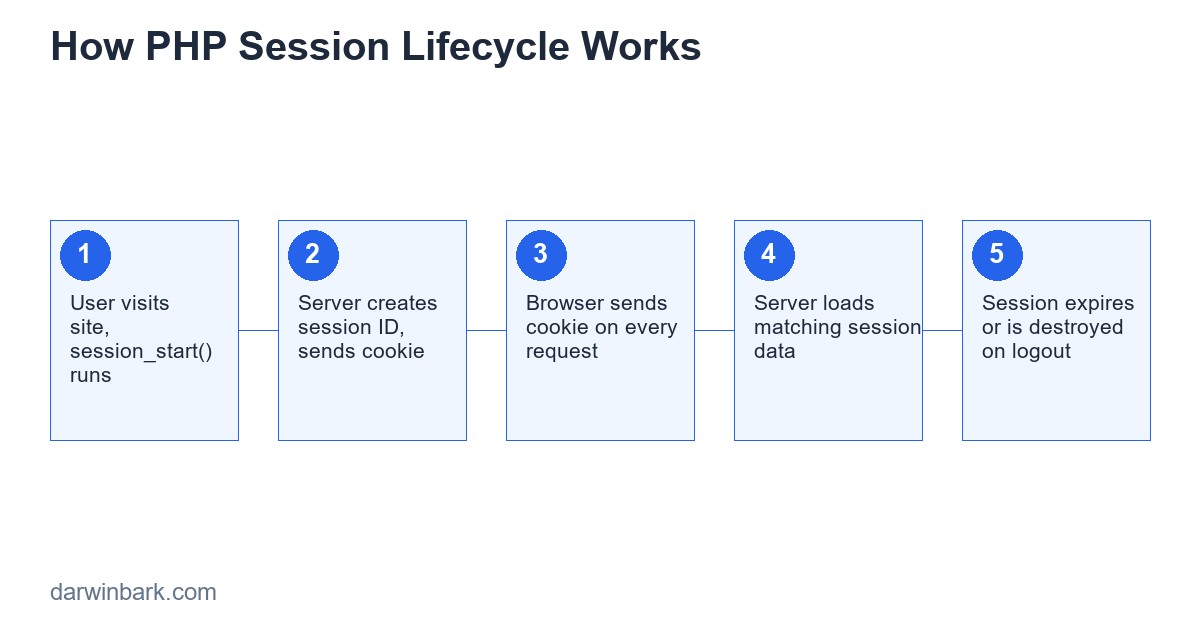
Sessions vs Cookies: A Direct Comparison
| Aspect | Cookies | Sessions |
|---|---|---|
| Where data lives | Client (browser) | Server (file/DB/cache) |
| What the client holds | The actual data | Only a random ID |
| Size limit | ~4KB per cookie | Effectively unlimited |
| Tamper resistance | Low, unless signed/encrypted | High, data never reaches client |
| Survives browser close | Only if expiry is set | Only if session cookie itself persists |
| Good for | Preferences, "remember me" tokens, analytics IDs | Login state, cart, CSRF tokens, anything sensitive |
Configuring Session Security in PHP
The default PHP session configuration is permissive enough to cause problems in production. A few settings are worth setting explicitly, either in php.ini or via session_set_cookie_params() before session_start() is called:
session_set_cookie_params([
    'lifetime' => 0,
    'path' => '/',
    'secure' => true,
    'httponly' => true,
    'samesite' => 'Lax',
]);
ini_set('session.use_strict_mode', 1);
session_start();
session.use_strict_mode rejects uninitialized session IDs sent by the client, which closes off a session-fixation technique where an attacker tricks a victim into using a session ID the attacker already knows.
Common Pitfalls That Cause Real Security Bugs
Session Fixation
If an attacker can set a victim's session ID before they log in (for example, via a URL parameter on a site that accepts session IDs from the query string), and the application doesn't generate a new ID after authentication, the attacker can then use that same known ID to access the now-logged-in session. The fix is always calling session_regenerate_id(true) immediately after a successful login.
Session Hijacking via XSS
If the session cookie lacks the httponly flag, any cross-site scripting vulnerability elsewhere on the site can be used to read the session cookie directly with JavaScript and exfiltrate it. This is why httponly should be considered non-negotiable for session cookies.
Storing Too Much in the Session
Putting large objects, full database result sets, or anything that grows unbounded into $_SESSION causes real performance problems, especially with file-based session storage where every request reads and rewrites the entire session file. Store IDs and small flags; re-fetch larger data from the database when needed.
Not Destroying Sessions Properly on Logout
A logout that only does unset($_SESSION['user_id']) leaves the session itself alive with a still-valid ID. A correct logout clears the data, destroys the session, and removes the cookie:
$_SESSION = [];
session_destroy();
setcookie(session_name(), '', time() - 3600, '/');
Practical Code Examples
Login Session
if (password_verify($password, $user->password_hash)) {
    session_regenerate_id(true);
    $_SESSION['user_id'] = $user->id;
    $_SESSION['logged_in_at'] = time();
}
"Remember Me" Using a Cookie Alongside a Session
A persistent login typically uses a long-lived cookie holding a random token (never the password, never the raw user ID), which is checked against a database table of valid remember-me tokens that can be individually revoked.
Shopping Cart in Session
if (!isset($_SESSION['cart'])) {
    $_SESSION['cart'] = [];
}
$_SESSION['cart'][$productId] = ($_SESSION['cart'][$productId] ?? 0) + 1;
Performance and Scaling Considerations
The default file-based session storage works fine on a single server. The moment an application runs on more than one server behind a load balancer, file-based sessions break unless requests are pinned to the same server ("sticky sessions") — and even then, it is fragile. The standard fix is moving session storage to something shared and fast, like Redis or a database table, so any server in the pool can read any user's session. This is a detail that catches a lot of growing applications off guard the first time they scale beyond one server.
Frequently Asked Questions
Can I use sessions without cookies?
Yes, technically — PHP can pass the session ID via the URL instead of a cookie, but this is strongly discouraged. Session IDs in URLs leak through browser history, referrer headers, and server logs, making them far easier to steal.
How long should a session last?
It depends on the sensitivity of the application. A banking application might expire sessions after 10-15 minutes of inactivity; a content site might allow days. There is no universal correct number — balance security against how disruptive re-login is for your specific users.
Are cookies always less secure than sessions?
Not inherently — a cookie holding only a random "remember me" token, checked against a revocable database record, can be reasonably safe. The risk comes from putting sensitive or trust-bearing data directly into a cookie's visible value.
What is session_regenerate_id actually protecting against?
It protects against session fixation by ensuring that even if an attacker somehow knew or set a session ID before login, that ID becomes useless the moment the user actually authenticates, since a fresh ID is issued at that point.
Should I store passwords or tokens directly in the session?
Never store a plain-text password in a session under any circumstance. Tokens (API tokens, CSRF tokens) are fine to store in a session since the data never leaves the server.
Conclusion
Sessions and cookies solve the same underlying problem — HTTP's lack of memory — from opposite directions: one keeps data on the server and gives the client a reference, the other gives the client the data directly. Picking the right one, and configuring it with the security flags covered here, is the difference between a feature that works in a demo and one that survives contact with real users and real attackers.
If your application is handling logins, payments, or any sensitive user data and you want a second opinion on whether your session handling is actually secure, we offer security-focused website audits — or if you are starting fresh, we can build the whole system properly from day one.
Database-Backed Session Storage: A Full Working Example
File-based sessions are the PHP default, but the moment an application runs on more than one server, or you want to query active sessions for an admin dashboard, file storage stops being convenient. PHP lets you swap the storage backend entirely by implementing SessionHandlerInterface and registering it with session_set_save_handler(). Here is a complete, working database-backed handler:
class DatabaseSessionHandler implements SessionHandlerInterface {
    private PDO $pdo;

    public function __construct(PDO $pdo) {
        $this->pdo = $pdo;
    }

    public function open($savePath, $sessionName): bool {
        return true;
    }

    public function close(): bool {
        return true;
    }

    public function read($id): string {
        $stmt = $this->pdo->prepare('SELECT data FROM sessions WHERE id = :id AND last_activity > :expiry');
        $stmt->execute(['id' => $id, 'expiry' => time() - 1440]);
        $row = $stmt->fetch();
        return $row ? $row['data'] : '';
    }

    public function write($id, $data): bool {
        $stmt = $this->pdo->prepare('REPLACE INTO sessions (id, data, last_activity) VALUES (:id, :data, :time)');
        return $stmt->execute(['id' => $id, 'data' => $data, 'time' => time()]);
    }

    public function destroy($id): bool {
        $stmt = $this->pdo->prepare('DELETE FROM sessions WHERE id = :id');
        return $stmt->execute(['id' => $id]);
    }

    public function gc($maxlifetime): int|false {
        $stmt = $this->pdo->prepare('DELETE FROM sessions WHERE last_activity < :expiry');
        $stmt->execute(['expiry' => time() - $maxlifetime]);
        return $stmt->rowCount();
    }
}

$handler = new DatabaseSessionHandler($pdo);
session_set_save_handler($handler);
session_start();
With this in place, every server behind a load balancer reads and writes the same sessions table, so it no longer matters which physical server handles any given request. This is also what makes a "log out everywhere" feature possible — deleting every row for a given user ID immediately invalidates every active session, something that is essentially impossible to do cleanly with file-based sessions spread across multiple servers.
Step-by-Step: Building a Complete Secure Login Flow
Putting everything covered so far together, here is the full sequence a properly built login endpoint follows, in order:
- Receive and validate input — check that email and password fields are present and properly formatted before doing anything else.
- Rate-limit the attempt — check (and increment) a failed-attempt counter for this email/IP combination before querying the database, so a brute-force script gets blocked early rather than hitting the database on every guess.
- Look up the user and verify the password with
password_verify()— never reveal whether the failure was "no such user" or "wrong password" in the response message. - Regenerate the session ID with
session_regenerate_id(true)immediately on success, before writing any session data. - Store only what is needed in the session — typically just the user ID and a timestamp, not the full user record.
- Reset the failed-attempt counter for this account now that login succeeded.
- Redirect, never render the post-login page directly from the POST handler — this avoids the browser prompting to resubmit the form on refresh.
Skipping or reordering any of these steps is exactly how login systems that "work" in testing turn out to have a security gap once they are actually attacked.
Debugging Common Session Problems
"My session keeps losing data between requests"
The most frequent cause is calling session_start() after some output has already been sent to the browser (even a stray blank line before an opening <?php tag counts), which silently fails on some configurations. Always call session_start() as the very first line of execution.
"Sessions work locally but not on the live server"
Usually a secure => true cookie setting on a site still being accessed over plain HTTP, or a session save path that does not exist or is not writable on the production server. Check the actual PHP error log on the live server, not just local behavior.
"Sessions are shared between two different subdomains when they should not be"
This happens when the session cookie's domain is set too broadly, such as ".example.com" instead of a specific subdomain, causing the cookie to be sent to every subdomain. Set the domain option explicitly to match the intended scope.
"I am getting session write errors under high traffic"
File-based sessions use file locking, and PHP's default behavior holds that lock for the entire duration of a request that has the session open — meaning concurrent requests from the same user (multiple browser tabs, or AJAX calls firing in parallel) effectively queue up waiting for each other. Calling session_write_close() as soon as a request is done writing session data (rather than waiting until script end) reduces this contention significantly.
More Frequently Asked Questions
What is the difference between session.gc_maxlifetime and the cookie lifetime?
session.gc_maxlifetime controls how long the server keeps session data before it becomes eligible for garbage collection; the cookie lifetime controls how long the browser holds onto the session ID. They are configured separately and mismatches between them are a common source of "my session expired sooner/later than expected" confusion.
Is it safe to store a JWT instead of using PHP sessions?
JWTs solve a different problem — they are useful for stateless authentication across services (APIs, microservices) where you genuinely do not want server-side session storage. For a typical server-rendered web application, PHP sessions are simpler, easier to revoke immediately, and avoid the token-revocation problems JWTs are known for.
Can two users share the same session ID by coincidence?
PHP session IDs are generated with a cryptographically secure random source and are long enough that accidental collision is not a realistic concern. The actual risks are fixation and theft, not coincidence.
Do I need CSRF tokens if I am already using SameSite cookies?
SameSite=Lax blocks most cross-site POST requests from carrying cookies, which mitigates a lot of CSRF risk, but it is not a complete replacement for explicit CSRF tokens, particularly because of edge cases in how different browsers historically implemented SameSite. Defense in depth still applies.
Session Storage Backends Compared
| Backend | Best For | Limitation |
|---|---|---|
| Files (default) | Single-server apps, local development | Breaks down across multiple servers without sticky sessions |
| Redis / Memcached | High-traffic, multi-server apps needing fast reads | Requires running and maintaining a separate service |
| Database table | Apps that need to query/audit active sessions, "log out everywhere" | Slightly slower than in-memory stores under very high load |
| Encrypted client-side cookie (stateless) | Simple apps wanting to avoid server-side storage entirely | Hard size limits, harder to revoke instantly, exposes more to the client |
Most growing applications start on file-based sessions and migrate to Redis or a database-backed handler the moment they add a second server — it is rarely worth building the more complex backend before that point actually arrives, but it is worth knowing the migration path exists and is not a rewrite, just a different SessionHandlerInterface implementation swapped in behind the same $_SESSION superglobal your application code already uses.
Cookie Consent and Legal Considerations
Regulations like GDPR (EU) and CCPA (California) distinguish between cookies that are "strictly necessary" for the site to function and those used for tracking, analytics, or advertising. A session cookie used purely to keep a user logged in is generally considered strictly necessary and does not require consent banners under most interpretations of these laws. Analytics cookies, advertising pixels, and third-party tracking cookies do typically require explicit, informed consent before being set. This distinction matters when deciding what belongs in a session versus what belongs in a separate, consent-gated cookie — mixing functional session data and tracking data into the same cookie makes compliance harder to reason about and audit later.
Cross-Domain and Subdomain Sessions in Real Projects
A common real-world requirement is sharing login state between a main site and a subdomain — for example, `example.com` and `app.example.com`. This requires setting the session cookie's domain explicitly to `.example.com` (with the leading dot, depending on browser conventions) so it is sent to both. Sharing a session across genuinely different top-level domains (`example.com` and a separate `example-app.io`) cannot be done with cookies alone at all, since cookies are scoped to a single registrable domain by browser design — that scenario requires a different approach entirely, such as a shared authentication token passed explicitly between the two systems (an OAuth-style flow, or a signed token exchanged once and verified independently by each domain).
A Note on Modern Alternatives
Some newer frameworks and APIs lean toward stateless authentication (JWTs, signed tokens) instead of server-side sessions, particularly for APIs consumed by mobile apps or single-page applications where a traditional cookie-based session is awkward to manage. This is a legitimate alternative for those specific use cases, but it trades away one of the biggest practical advantages of server-side sessions: instant revocation. A session can be destroyed server-side immediately; a JWT, by design, remains valid until it expires unless you build a separate revocation/blocklist system anyway — at which point you have effectively rebuilt server-side session state, just with extra steps. For a typical server-rendered business website or web application, traditional PHP sessions remain the simpler and safer default.
Final Checklist Before Shipping Session-Based Authentication
- Session cookie has
httponly,secure, and an appropriatesamesitevalue set session_regenerate_id(true)called immediately after every login and any privilege change- Logout clears
$_SESSION, callssession_destroy(), and expires the cookie explicitly - Session storage backend matches your actual deployment (file storage is not safe to assume on multi-server setups)
- Nothing sensitive (raw passwords, full payment details) is ever written into
$_SESSION - Idle timeout and absolute session lifetime are both considered, not just one or the other
Case Study: Fixing a Real Vulnerable Login System
A pattern we see often when auditing existing PHP sites: a login system built years ago, working fine on the surface, quietly carrying three or four of the issues covered in this guide at once. A typical version looks like this before a fix — passwords hashed with a single round of MD5, no session regeneration after login, a session cookie missing both httponly and secure, and no rate limiting on the login form at all. None of these show up as bugs in normal use; the site works perfectly for every legitimate user. They only become visible the moment someone deliberately tries to abuse the system, at which point all four problems compound into something serious: a leaked database instantly gives up every password (MD5 is fast to crack at scale), and even without a leak, a stolen session cookie or an unthrottled brute-force script can walk straight in.
The fix sequence is exactly the items already covered: rehash passwords to bcrypt on next successful login (you cannot retroactively rehash without the plain-text password, so this has to happen gradually as users log in, comparing against the old hash once and re-saving with password_hash()), add session_regenerate_id(true) immediately after authentication, set the missing cookie flags, and add a failed-attempt counter per account. None of these changes are large individually. The risk was never complexity — it was that nobody had gone through the checklist at all.
Glossary of Terms Used in This Guide
- Session fixation — an attack where the attacker sets or predicts a victim's session ID before login, then uses that same ID after the victim authenticates.
- Session hijacking — theft of an already-valid session ID, often via XSS or network interception, allowing an attacker to impersonate a logged-in user.
- CSRF (Cross-Site Request Forgery) — tricking a logged-in user's browser into submitting an unwanted request to a site they are authenticated on, exploiting the browser's automatic cookie attachment.
- Sticky sessions — a load balancer configuration that always routes a given user to the same backend server, used as a workaround for file-based sessions on multi-server setups.
- Idle timeout vs absolute timeout — idle timeout ends a session after a period of inactivity; absolute timeout ends it a fixed time after login regardless of activity. Secure systems often use both.
Getting session handling right is one of those areas where the individual concepts are each simple, but skipping just one of them quietly reopens a real vulnerability. If you want a second set of eyes on an existing system, or are building something new and want it done right from the start, get in touch for a free consultation.